
Graphing Service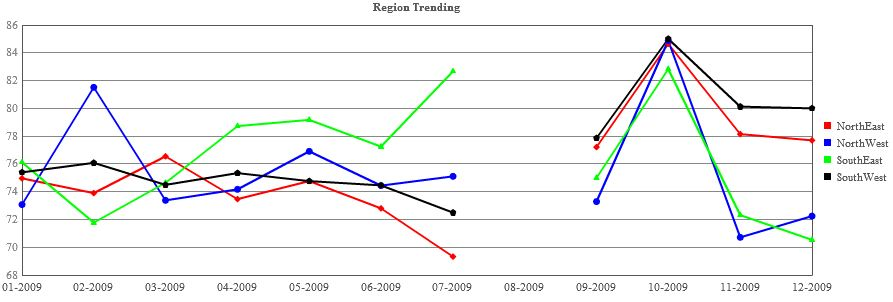
A multi-line chart is essentially a CROSSTAB report in graphical form, and as such we use the {|CROSSTAB|} report command.
{|CROSSTAB|}
#start graph with the {|GRAPH|} command
{|GRAPH|}
#indicates that our graph should be of type 'line' (l)
graph/t/l
#graph should be 900 pixels wide
/w/900
#graph should be 300 pixels high
/h/300
#graph title
/n/Region%20Trending
#our data - regions crosstabbed by month-year
#each region gets a data string, indicated by /d[some number]/
/d0/{|LOOP|CROSSTAB.REGIONS(SORT=NAME,CROSSTAB_FILTER=NO_BLANKS)}
{|LOOP|REGIONS.MONTH_YEAR(SORT=ORDER_NUM,CROSSTAB_FILTER=WITH_BLANKS_IN_RANGE)}
{AVG(MONTH_YEAR.PERCENT_SCORE)}{LOOP.HASNEXT?,}
{/|LOOP|}
#displays the /d[some number]/ for the next loop
{|SHOWIF|LOOP.HASNEXT}/d{LOOP.COUNT}/{/|SHOWIF|}
#on the last time through the region loop, display labels for the month-years
{|VANISHIF|LOOP.HASNEXT}
/l/{|LOOP|REGIONS.MONTH_YEAR}{MONTH_YEAR.NAME.FUSIONSAFE}{LOOP.HASNEXT?,}{/|LOOP|}
{/|VANISHIF|}
{/|LOOP|}
#our legend keys
#each region gets a key, indicated by /k[some number]/
/k0/{|LOOP|CROSSTAB.REGIONS}
{REGIONS.NAME.FUSIONSAFE}
{|LOOP|REGIONS.MONTH_YEAR}{/|LOOP|}
#displays the /k[some number]/ for the next loop
{|SHOWIF|LOOP.HASNEXT}/k{LOOP.COUNT}/{/|SHOWIF|}
{/|LOOP|}
#color scheme for graph
/c/ff0000,0000ff,00ff00,000000
#apikey required for authentication
?apikey={CONFIG.PDF_API_KEY}
{/|GRAPH|}
{/|CROSSTAB|}
HighCharts
{|CROSSTAB|}#highcharts need a container
<div id="my-graph">
{|HIGHCHARTS|}
{
#graph title
"title": {
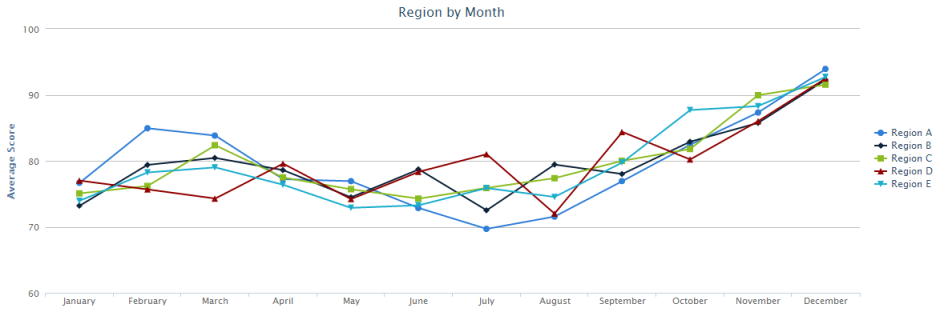
"text": "Region by Month",
"x": -20
},
#y-axis settings
"yAxis": {
"title": {
"text": "Average Score"
},
"plotLines": [{
"value": 0,
"width": 1,
"color": "#808080"
}],
"min": 60
},
#hide the highcharts label
"credits": {
"enabled": false
},
#don't animate our graph
"plotOptions": {
"line": {
"animation": false
}
},
#position the legend to distinguish between our series
"legend": {
"layout": "vertical",
"align": "right",
"verticalAlign": "middle",
"borderWidth": 0
},
{|LOOP|CROSSTAB.CLIENT_55_LEVEL_3(SORT=NAME,CROSSTAB_FILTER=NO_BLANKS)}
#display our x-axis labels
#we only need to do this once
{|SHOWIF|LOOP.ISFIRST}
"xAxis": {
"categories": [
#HC_SAFE_STRING handles escaping quotes. names should have quotes around them
{|LOOP|CLIENT_55_LEVEL_3.MONTH_OF_YEAR(SORT=ORDER_NUM)}
"{MONTH_OF_YEAR.NAME.HC_SAFE_STRING}"{LOOP.HASNEXT?,}
{/|LOOP|}
]
},
#we will have a series per region
"series": [
{/|SHOWIF|}
{
#label our line in the legend
"name": "{CLIENT_55_LEVEL_3.NAME.HC_SAFE_STRING}",
#data for the region. HC_SAFE_NUMBER deals with nulls
"data": [{|LOOP|CLIENT_55_LEVEL_3.MONTH_OF_YEAR}
{AVG(MONTH_OF_YEAR.PERCENT_SCORE).HC_SAFE_NUMBER}{LOOP.HASNEXT?,}
{/|LOOP|}]
}{LOOP.HASNEXT?,}
{/|LOOP|}
]
}
{/|HIGHCHARTS|}
</div>
{/|CROSSTAB|}