
A client may wish to have their scores displayed in terms of a gauge (or speedometer) image.
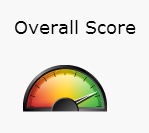
There are two types of gauges in the standard image library – blue and rainbow. The ‘blue’ versions come in size 85 pixels, the rainbow in 35 or 85.
To include one of these images you’ll want to use a URL like:
[Base URL for the MSP]/images/general/superGauges/rainbow/85/
You’ll then use the appropriate tag for the score you’re displaying, with a few conditionals to add leading zeros, like:
<img src="http://www.sassieshop.com/[msp]/images/general/superGauges/rainbow/85/{AVG(DATATYPES.SHOW_DATATYPE.PERCENT_SCORE).ROUND<100?0}{AVG(DATATYPES.SHOW_DATATYPE.PERCENT_SCORE).ROUND<10?0}{AVG(DATATYPES.SHOW_DATATYPE.PERCENT_SCORE).ROUND}.png"/>