
Use Case
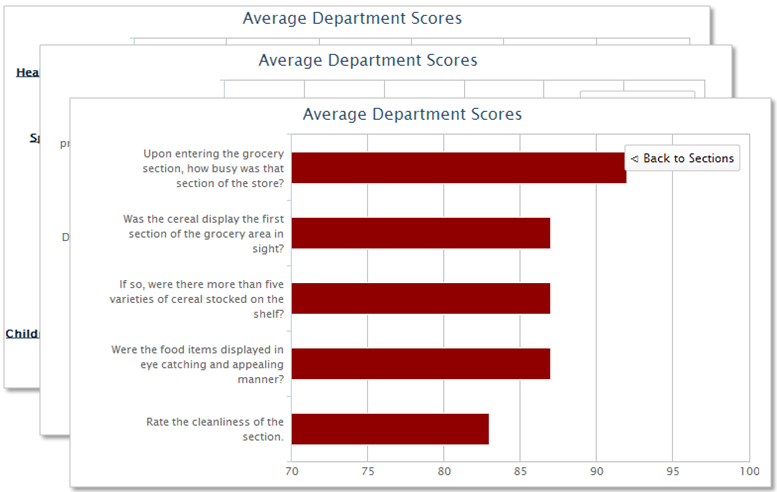
The client wants to see their sectional scores on a graph, one for each of their departments. But then they want to be able to click on the sectional scores and drill into the questions that make up those sections, to see which questions are helping and hurting the sectional scores.
Report
Code
{|SHOWIF|OUTPUT_MODE=|EVALCONST(KNICKERS_OUTPUT_STANDARD)|}{DATATYPES.CONTROLS_START}
{DATATYPES.DEFAULT_DATE_FILTERS}
{DATATYPES.CONTROLS_END}{/|SHOWIF|}
<div class='results'>
{|VANISHIF|COUNT(DATATYPES.SHOW_DATATYPE)}
<div class='ui-state-highlight no-data'><p>No data was found to display</p></div>
{/|VANISHIF|}
{|SHOWIF|COUNT(DATATYPES.SHOW_DATATYPE)}
<div id='my-graph'>
{|HIGHCHARTS|}
{
"chart": {
"type": "bar",
"height": 400,
"width": 700,
"plotBorderWidth": 1
},
"title": {
"text": "Average Department Scores"
},
"yAxis": {
"title": {
"text": ""
},
"min": 70,
"max": 100
},
"xAxis": {
"type": "category"
},
"legend": {
"enabled": false
},
"credits": {
"enabled": false
},
"plotOptions": {
"bar": {
"animation": false
}
},
#setup a series for our sectional scores
"series": [
{
"name": "Sections",
"colorByPoint": true,
{|RESULT|}
"data": [{|LOOP|RESULT.CLIENTS(SORT=NAME)}
#loop all sectional score properties
{|LOOP|CLIENTS.PROPERTIES(FILTER=type|eq|major_sectional_percent_score,SORT=ORDER_NUM)}
{
#label with section name
"name":"{PROPERTIES.NAME.SPLIT(:,1).HC_SAFE_STRING}",
#value is the average sectional score
"y": {AVG(CLIENTS.PROPERTIES.VALUE).ROUND.HC_SAFE_NUMBER},
#drilldown into the series w/ our section ID
"drilldown":"question_for_section_{PROPERTIES.PROPERTY_ID.SPLIT(_,5)}"
}{LOOP.HASNEXT?,}
{/|LOOP|}
{/|LOOP|}]
{/|RESULT|}
}
],
"drilldown":{
#this is a separate 'result' block so the dynamic tag looping we're doing doesn't interfere
#with the query for the specific properties above
{|RESULT|}
"series":[
#create a drilldown series for every section
{|LOOP|DATATYPES.SHOW_DATATYPE.TAGS(FILTER=type|likewild|question_for_section,SORT=TAG_VALUE)}
{
"name": "Average Score",
#use the tag as the series ID, so we know where to drilldown from
"id":"{TAGS.TAG_VALUE}",
"data": [{|LOOP|RESULT.CLIENTS(SORT=NAME)}
#loop the questions within the section, and get their percent scores
{|LOOP|CLIENTS.PROPERTIES(FILTERSET=type|eq|question_percent_score;type|eq||EVALTAG(TAGS.TAG_VALUE)|,SORT=ORDER_NUM)}
{
#label with the question text
"name":"{PROPERTIES.NAME.SPLIT(:,1).HC_SAFE_STRING}",
#the value is the average question score
"y": {AVG(CLIENTS.PROPERTIES.VALUE).ROUND.HC_SAFE_NUMBER}
}{LOOP.HASNEXT?,}
{/|LOOP|}
{/|LOOP|}]
}{LOOP.HASNEXT?,}
{/|LOOP|}
]
{/|RESULT|}
}
}
{/|HIGHCHARTS|}
</div>
{/|RESULT|}
{/|SHOWIF|}
</div>
CSS
@import "themeroller/jquery.ui.all.css";
@import "chrome.theme.css";
@import "chrome.layout.css";