
Use Case
The client would like to see shops with abnormal scores vs their location’s average. They would like to see shops that scored 10% or more above the location average, as well as shops that scored 10% or more below the location average. They would like to see the difference between each shop’s score and its location’s average and a link to view each shop’s Client Shop View.
Report
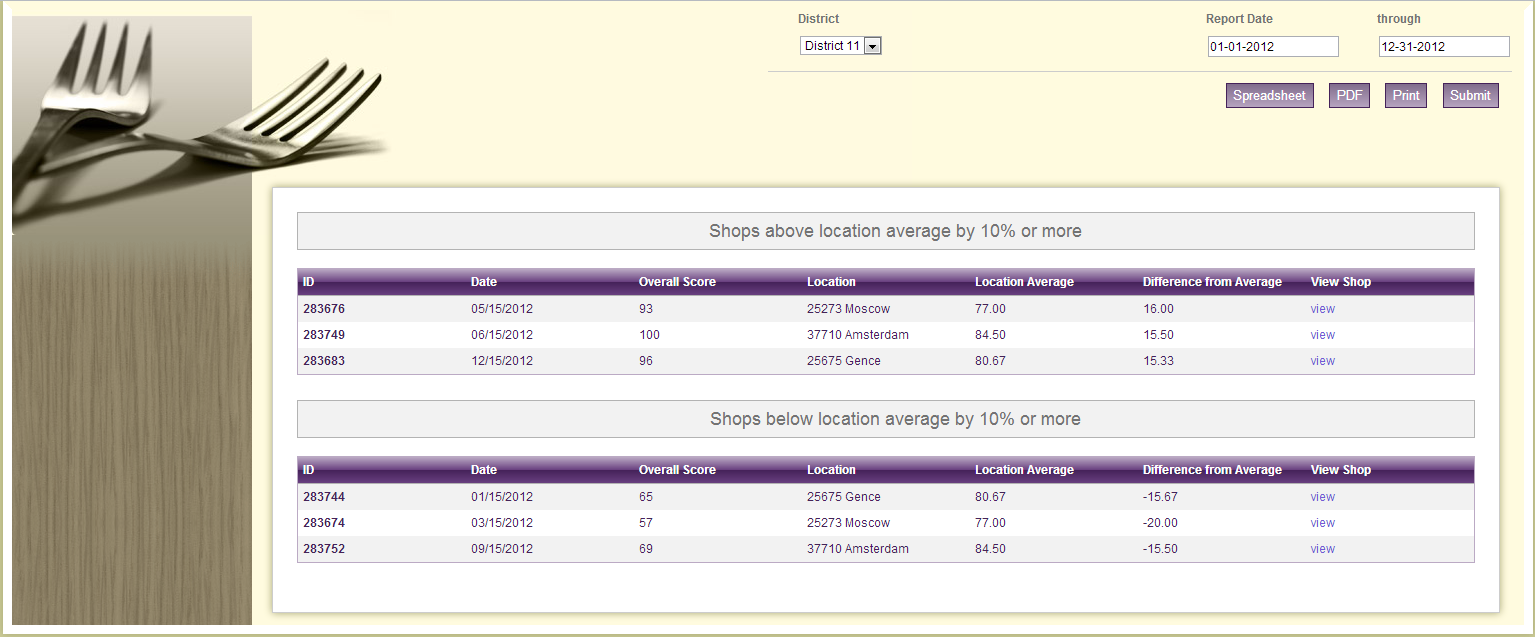
Code
{|SHOWIF|OUTPUT_MODE=|EVALCONST(KNICKERS_OUTPUT_STANDARD)|}{DATATYPES.CONTROLS_START}
{DATATYPES.DEFAULT_DATE_FILTERS}
<div>
<label>{DATATYPES.SHOW_DATATYPE.CLIENT_49_LEVEL_2.NAME}</label>
{DATATYPES.SHOW_DATATYPE.CLIENT_49_LEVEL_2_SELECTOR.INPUT}
</div>
{DATATYPES.CONTROLS_END}{/|SHOWIF|}
<div class='results'>
{|VANISHIF|COUNT(DATATYPES.SHOW_DATATYPE)}
<div class='ui-state-highlight no-data'><p>No data was found to display</p></div>
{/|VANISHIF|}
{|SHOWIF|COUNT(DATATYPES.SHOW_DATATYPE)}
{|RESULT|}
<div id="data-table">
<h3>Shops above location average by 10% or more</h3>
{|LOOP|RESULT.DATAPOINTS(SORT=TRENDING_TIMESTAMP)}
{|SHOWIF|LOOP.ISFIRST}
<table class='data'>
<thead>
<tr>
<th>{|SORT_TOGGLE|ID}ID{/|SORT_TOGGLE|}</th>
<th>{|SORT_TOGGLE|TRENDING_TIMESTAMP}Date{/|SORT_TOGGLE|}</th>
<th>{|SORT_TOGGLE|PERCENT_SCORE}Overall Score{/|SORT_TOGGLE|}</th>
<th>{|SORT_TOGGLE|CLIENT_49_LEVEL_1.NAME}Location{/|SORT_TOGGLE|}</th>
<th>{|SORT_TOGGLE|AVG(DATAPOINTS.PERCENT_SCORE,CLIENT_49_LEVEL_1)}Location Average{/|SORT_TOGGLE|}</th>
<th>{|SORT_TOGGLE|CALC(DATAPOINTS.PERCENT_SCORE - AVG(DATAPOINTS.PERCENT_SCORE,CLIENT_49_LEVEL_1))}Difference from Average{/|SORT_TOGGLE|}</th>
<th>View Shop</th>
</tr>
</thead>
<tbody>
{/|SHOWIF|}
#only display if the score difference is greater than or equal to 10
{|SHOWIF|CALC(DATAPOINTS.PERCENT_SCORE - AVG(DATAPOINTS.PERCENT_SCORE,CLIENT_49_LEVEL_1))>=10}
<tr>
<th>{DATAPOINTS.ID}</th>
<td>{DATAPOINTS.TRENDING_TIMESTAMP.FORMATTED(m/d/Y)}</td>
<td>{DATAPOINTS.PERCENT_SCORE}</td>
<td>{DATAPOINTS.CLIENT_49_LEVEL_1.NAME}</td>
<td>{AVG(DATAPOINTS.PERCENT_SCORE,CLIENT_49_LEVEL_1).NUMBERFORMAT(2)}</td>
<td>{CALC(DATAPOINTS.PERCENT_SCORE - AVG(DATAPOINTS.PERCENT_SCORE,CLIENT_49_LEVEL_1)).NUMBERFORMAT(2)}</td>
#link to shop in SASSIE
<td><a href="http://www.sassieshop.com/2su/clients/ClientShopView.php?JobID={DATAPOINTS.ID}" target="_blank">view</a></td>
</tr>
{/|SHOWIF|}
{/|LOOP|}
</tbody>
</table>
<h3>Shops below location average by 10% or more</h3>
<table class='data'>
{|LOOP|RESULT.DATAPOINTS(SORT=TRENDING_TIMESTAMP)}
{|SHOWIF|LOOP.ISFIRST}
<table class='data'>
<thead>
<tr>
<th>{|SORT_TOGGLE|ID}ID{/|SORT_TOGGLE|}</th>
<th>{|SORT_TOGGLE|TRENDING_TIMESTAMP}Date{/|SORT_TOGGLE|}</th>
<th>{|SORT_TOGGLE|PERCENT_SCORE}Overall Score{/|SORT_TOGGLE|}</th>
<th>{|SORT_TOGGLE|CLIENT_49_LEVEL_1.NAME}Location{/|SORT_TOGGLE|}</th>
<th>{|SORT_TOGGLE|AVG(DATAPOINTS.PERCENT_SCORE,CLIENT_49_LEVEL_1)}Location Average{/|SORT_TOGGLE|}</th>
<th>{|SORT_TOGGLE|CALC(DATAPOINTS.PERCENT_SCORE - AVG(DATAPOINTS.PERCENT_SCORE,CLIENT_49_LEVEL_1))}Difference from Average{/|SORT_TOGGLE|}</th>
<th>View Shop</th>
</tr>
</thead>
<tbody>
{/|SHOWIF|}
#only display if the score difference is greater than or equal to -10
{|SHOWIF|CALC(DATAPOINTS.PERCENT_SCORE - AVG(DATAPOINTS.PERCENT_SCORE,CLIENT_49_LEVEL_1))<=-10}
<tr>
<th>{DATAPOINTS.ID}</th>
<td>{DATAPOINTS.TRENDING_TIMESTAMP.FORMATTED(m/d/Y)}</td>
<td>{DATAPOINTS.PERCENT_SCORE}</td>
<td>{DATAPOINTS.CLIENT_49_LEVEL_1.NAME}</td>
<td>{AVG(DATAPOINTS.PERCENT_SCORE,CLIENT_49_LEVEL_1).NUMBERFORMAT(2)}</td>
<td>{CALC(DATAPOINTS.PERCENT_SCORE - AVG(DATAPOINTS.PERCENT_SCORE,CLIENT_49_LEVEL_1)).NUMBERFORMAT(2)}</td>
#link to shop in SASSIE
<td><a href="http://www.sassieshop.com/2su/clients/ClientShopView.php?JobID={DATAPOINTS.ID}" target="_blank">view</a></td>
</tr>
{/|SHOWIF|}
{/|LOOP|}
</tbody>
</table>
</div>
{/|RESULT|}
{/|SHOWIF|}
</div>
CSS
/* css for Outliers1349207395831 */
@import "themeroller/jquery.ui.all.css";
@import "chrome.theme.css";
@import "chrome.layout.css";
/***** dining 2012 *****/
body {
background: #cccc99;
}
.data thead a
{
color: white;
text-decoration: underline;
}
.wrap {
padding-bottom: 2em;
}
header.main, .header.main {
background: transparent;
border: 0;
padding: 0;
-moz-box-shadow: none;
-webkit-box-shadow: none;
box-shadow: none;
}
#content {
background: #fffbdf url("http://sassieshop.com/2su/images/semantic/dining/bg_side_header.gif") no-repeat 0px 225px;
border: 9px solid #fff;
border-top: 9px solid #fffbdf;
padding: 0;
-moz-border-radius: 0;
-webkit-border-radius: 0;
border-radius: 0;
-moz-box-shadow: 0px 0px 12px #a5a573;
-webkit-box-shadow: 0px 0px 12px #a5a573;
box-shadow: 0px 0px 12px #a5a573;
}
fieldset {
background: #fffbdf url("http://sassieshop.com/2su/images/semantic/dining/bg_container.jpg") no-repeat;
border: 0;
height: 225px;
padding: 0 1em;
text-align: right;
}
fieldset > div, fieldset .level-input {
float: right;
width: 25%;
text-align: left;
}
fieldset .date-input {
width: auto;
}
fieldset .date-input div {
float: left;
margin-left: 3em;
}
fieldset .controls {
border-top: 1px solid #ccc;
clear: both;
padding-top: 9px;
width: 50%;
}
fieldset .controls button {
background: #816d8c; /* Old browsers */
background: -moz-linear-gradient(top, #816d8c 0%, #b6a3bf 100%); /* FF3.6+ */
background: -webkit-gradient(linear, left top, left bottom, color-stop(0%,#816d8c), color-stop(100%,#b6a3bf)); /* Chrome,Safari4+ */
background: -webkit-linear-gradient(top, #816d8c 0%,#b6a3bf 100%); /* Chrome10+,Safari5.1+ */
background: -o-linear-gradient(top, #816d8c 0%,#b6a3bf 100%); /* Opera 11.10+ */
background: -ms-linear-gradient(top, #816d8c 0%,#b6a3bf 100%); /* IE10+ */
background: linear-gradient(to bottom, #816d8c 0%,#b6a3bf 100%); /* W3C */
filter: progid:DXImageTransform.Microsoft.gradient( startColorstr='#816d8c', endColorstr='#b6a3bf',GradientType=0 ); /* IE6-9 */
border: 1px solid #452259;
color: #fff;
font-size: 1.1em;
float: right;
margin-right: 1em;
padding: .25em .5em;
-moz-border-radius: 0;
-webkit-border-radius: 0;
border-radius: 0;
}
fieldset .controls button:hover {
background: #452259;
border: 2px solid #2e6e9e;
color: #fff;
-moz-box-shadow: 0px 0px 12px #fff;
-webkit-box-shadow: 0px 0px 12px #fff;
box-shadow: 0px 0px 12px #fff;
border: 1px solid #fff;
}
.results {
background: #fff;
border: 1px solid #ccc;
margin: -4em 2em 1em 260px;
padding: 2em;
-moz-box-shadow: 0px 0px 12px #a5a573;
-webkit-box-shadow: 0px 0px 12px #a5a573;
box-shadow: 0px 0px 12px #a5a573;
}
.results:before,
.results:after {
content:"";
display:table;
}
.results:after {
clear:both;
}
#data-table table {
border: 1px solid #bbaac4;
float: none;
width: 100%;
margin-bottom:25px;
}
thead th {
background: #bbaac4; /* Old browsers */
background: -moz-linear-gradient(top, #bbaac4 0%, #683f7f 50%, #452259 51%, #683f7f 100%); /* FF3.6+ */
background: -webkit-gradient(linear, left top, left bottom, color-stop(0%,#bbaac4), color-stop(50%,#683f7f), color-stop(51%,#452259), color-stop(100%,#683f7f)); /* Chrome,Safari4+ */
background: -webkit-linear-gradient(top, #bbaac4 0%,#683f7f 50%,#452259 51%,#683f7f 100%); /* Chrome10+,Safari5.1+ */
background: -o-linear-gradient(top, #bbaac4 0%,#683f7f 50%,#452259 51%,#683f7f 100%); /* Opera 11.10+ */
background: -ms-linear-gradient(top, #bbaac4 0%,#683f7f 50%,#452259 51%,#683f7f 100%); /* IE10+ */
background: linear-gradient(to bottom, #bbaac4 0%,#683f7f 50%,#452259 51%,#683f7f 100%); /* W3C */
filter: progid:DXImageTransform.Microsoft.gradient( startColorstr='#bbaac4', endColorstr='#683f7f',GradientType=0 ); /* IE6-9 */
color: #fff;
}
tbody tr:nth-child(odd) {
background: #f5f0f7;
color: #452259;
}
tbody tr:nth-child(even) {
background: #fff;
color: #452259;
}
tbody tr th {
background: transparent
}
#summary-graph .grapher {
margin: 0 auto;
text-align: center;
}
/***** print mode *****/
body.output-mode-print,
.output-mode-print #content,
.output-mode-print .results
{
background: #fff;
border: 0;
margin: 0 auto;
padding: 0;
-moz-box-shadow: none;
-webkit-box-shadow: none;
box-shadow: none;
}
.output-mode-print .results {
margin: 2em;
}