
Use Case
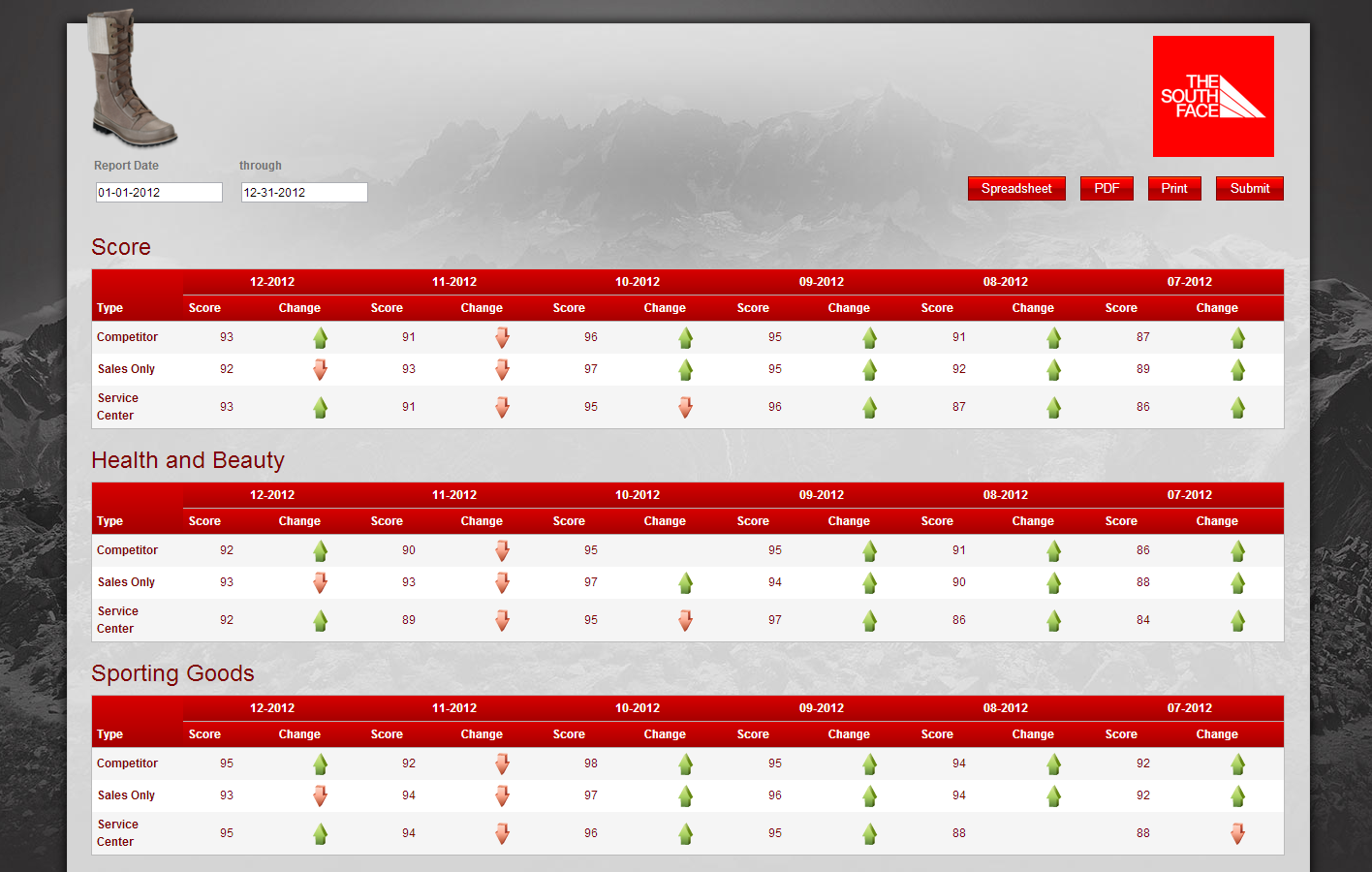
The client would like to see each of their scores (overall and sectional) trended for 6 months. They would like to see the average score and an indicator of whether that score increased or decreased from the previous month.
Report
Code
<img class="photo" src="http://sassieshop.com/2su/custom/chameleon/images/southface/boot.png" border="0" alt="">
<img class="logo" src="http://sassieshop.com/2su/custom/chameleon/images/southface/southface-logo.png" border="0" alt="">
<div class="clear"></div>
{|SHOWIF|OUTPUT_MODE=|EVALCONST(KNICKERS_OUTPUT_STANDARD)|}{DATATYPES.CONTROLS_START}
{DATATYPES.DEFAULT_DATE_FILTERS}
{DATATYPES.CONTROLS_END}{/|SHOWIF|}
<div class='results'>
{|VANISHIF|DATATYPES.SHOW_DATATYPE.TOTAL_COUNT}
<div class='ui-state-highlight no-data'><p>No data was found to display</p></div>
{/|VANISHIF|}
{|SHOWIF|DATATYPES.SHOW_DATATYPE.TOTAL_COUNT}
#loop our percent score properties, sorted in order
{|LOOP|DATATYPES.SHOW_DATATYPE.PROPERTIES(FILTER=type|eq|percent_score,SORT=ORDER_NUM)}
<h2 class='score-title'>
#this will strip off the Sec# (score): part of our score titles
{PROPERTIES.NAME.SPLIT(:,1)}
#this compensates for the fact that the overall score doesn't have a colon
{PROPERTIES.NAME.SPLIT(:,1)?:|EVALTAG(PROPERTIES.NAME)|}
</h2>
#generate a crosstab table for each property
{|CROSSTAB|}
<div>
#crosstab location groups against month-year
{|LOOP|CROSSTAB.CLIENT_49_GROUP(SORT=NAME)}
{|SHOWIF|LOOP.ISFIRST}
<table id='data-table' class='data'>
<thead>
<tr>
<th class="group-header typehead" rowspan="2">{DATATYPES.SHOW_DATATYPE.CLIENT_49_GROUP.NAME}</th>
#show a header for each month-year
#sorting descending will trend backward in time
#we filter by WITH_BLANKS_IN_RANGE to catch empty months, but only if they're within the range
#of existing data
{|LOOP|CLIENT_49_GROUP.MONTH_YEAR(SORT=ORDER_NUM|DESC,LIMIT=6,CROSSTAB_FILTER=WITH_BLANKS_IN_RANGE)}
<th class="month-header" colspan="2">{MONTH_YEAR.NAME}</th>
{/|LOOP|}
</tr>
<tr>
#display score/change headers for each month-year
{|LOOP|CLIENT_49_GROUP.MONTH_YEAR(SORT=ORDER_NUM|DESC,LIMIT=6,CROSSTAB_FILTER=WITH_BLANKS_IN_RANGE)}
<th>Score</th>
<th>Change</th>
{/|LOOP|}
</tr>
</thead>
<tbody>
{/|SHOWIF|}
<tr>
<th>{CLIENT_49_GROUP.NAME}</th>
{|LOOP|CLIENT_49_GROUP.MONTH_YEAR}
#here we loop our properties again, but since we're filtering property id by the ID
#of the property from the outer loop, we actually only have one property
{|LOOP|MONTH_YEAR.PROPERTIES(FILTER=PROPERTY_ID|eq||EVALTAG(PROPERTIES.PROPERTY_ID)|)}
#display the average for this month-year and location group
<td>{AVG(MONTH_YEAR.PROPERTIES.VALUE).ROUND}</td>
#display a cell that indicates change via a css class
#here, we're comparing the current score to the previous score (using NEXT because we're trending backwards)
#we use whether this difference is greater than, less than, or equal to zero to set our class
<td class="score-change {CALC(AVG(MONTH_YEAR.PROPERTIES.VALUE) - NEXT(AVG(MONTH_YEAR.PROPERTIES.VALUE))).ROUND>0?score-change-positive}
{CALC(AVG(MONTH_YEAR.PROPERTIES.VALUE) - NEXT(AVG(MONTH_YEAR.PROPERTIES.VALUE))).ROUND=0?score-change-neutral}
{CALC(AVG(MONTH_YEAR.PROPERTIES.VALUE) - NEXT(AVG(MONTH_YEAR.PROPERTIES.VALUE))).ROUND<0?score-change-negative}"></td>
{/|LOOP|}
{/|LOOP|}
</tr>
{|VANISHIF|LOOP.HASNEXT}
</tbody>
</table>
{/|VANISHIF|}
{/|LOOP|}
</div>
{/|CROSSTAB|}
{/|LOOP|}
{/|SHOWIF|}
</div>
CSS
/* css for 6-monthTrending1347556492281 */
@import "themeroller/jquery.ui.all.css";
@import "chrome.theme.css";
@import "chrome.layout.css";
.score-change
{
height: 25px;
background-repeat:no-repeat;
background-size:25px 25px;
background-position:center;
}
.score-change-positive
{
background-image: url('http://www.sassieshop.com/2su/images/general/arrows/arrow_up_2c_25.png');
}
.score-change-neutral
{
}
.score-change-negative
{
background-image: url('http://www.sassieshop.com/2su/images/general/arrows/arrow_down_2c_25.png');
}
.month-header
{
text-align:center;
}
.group-header
{
vertical-align:bottom;
}
#data-table
{
width:auto;
}
#data-table tbody td
{
text-align:center;
}
.score-title
{
margin-top: 1em;
margin-bottom: 0;
padding-bottom:0;
border: 0px solid black;
}
/***** southface *****/
body {
background: #313030 url("http://sassieshop.com/2su/custom/chameleon/images/southface/bg.jpg") no-repeat top center fixed;
}
.wrap {
padding: 2em 0;
}
header.main, .header.main {
background: transparent;
border: 0;
padding: 0;
-moz-box-shadow: none;
-webkit-box-shadow: none;
box-shadow: none;
}
#content {
background: #ddd url("http://sassieshop.com/2su/custom/chameleon/images/southface/bg-content.jpg") no-repeat top center fixed;
border: 1px solid #ccc;
padding: 0;
-moz-border-radius: 0;
-webkit-border-radius: 0;
border-radius: 0;
-moz-box-shadow: 0px 0px 18px #000;
-webkit-box-shadow: 0px 0px 18px #000;
box-shadow: 0px 0px 18px #000;
}
#content img.photo {
margin: -1.5em 0 0 1.5em;
height: 150px;
}
#content img.logo {
float: right;
margin: 1em 3em 0 0;
height: 125px;
}
.clear {
clear: both;
}
fieldset {
background: transparent;
border: 0;
padding: 0 1em;
text-align: right;
}
fieldset > div, fieldset .level-input {
float: left;
width: 25%;
text-align: left;
}
fieldset .date-input {
width: 50%;
}
fieldset .date-input div {
float: left;
margin-left: 15px;
}
fieldset .controls, fieldset .ui-controls {
float: right;
margin: 1.5em 1em 0 0;
text-align: right;
width: 40%;
}
fieldset .controls button {
background: #ff6a00; /* Old browsers */
background: -moz-linear-gradient(top, #ff6a00 0%, #ff0000 10%, #d80000 49%, #a50000 51%, #cc0000 100%); /* FF3.6+ */
background: -webkit-gradient(linear, left top, left bottom, color-stop(0%,#ff6a00), color-stop(10%,#ff0000), color-stop(49%,#d80000), color-stop(51%,#a50000), color-stop(100%,#cc0000)); /* Chrome,Safari4+ */
background: -webkit-linear-gradient(top, #ff6a00 0%,#ff0000 10%,#d80000 49%,#a50000 51%,#cc0000 100%); /* Chrome10+,Safari5.1+ */
background: -o-linear-gradient(top, #ff6a00 0%,#ff0000 10%,#d80000 49%,#a50000 51%,#cc0000 100%); /* Opera 11.10+ */
background: -ms-linear-gradient(top, #ff6a00 0%,#ff0000 10%,#d80000 49%,#a50000 51%,#cc0000 100%); /* IE10+ */
background: linear-gradient(to bottom, #ff6a00 0%,#ff0000 10%,#d80000 49%,#a50000 51%,#cc0000 100%); /* W3C */
filter: progid:DXImageTransform.Microsoft.gradient( startColorstr='#ff6a00', endColorstr='#cc0000',GradientType=0 ); /* IE6-9 */
border: 1px solid #800000;
color: #fff;
font-size: 1.1em;
float: right;
margin-left: 1em;
padding: .25em 1em;
-moz-border-radius: 0;
-webkit-border-radius: 0;
border-radius: 0;
}
fieldset .controls button:hover {
background: #cc0000;
border: 1px solid #000;
color: #fff;
-moz-box-shadow: 0px 0px 12px #666;
-webkit-box-shadow: 0px 0px 12px #666;
box-shadow: 0px 0px 12px #666;
}
h2,
.score-title
{
color: #800000;
margin-bottom: .5em;
}
.results {
margin: 0;
padding: 0 2em 2em 2em;
}
.results:before,
.results:after {
content:"";
display:table;
}
.results:after {
clear:both;
}
table#data-table {
border: 1px solid #bbb;
float: none;
width: 100%;
-moz-border-radius: 0;
-webkit-border-radius: 0;
border-radius: 0;
}
thead th {
background: #d80000; /* Old browsers */
background: -moz-linear-gradient(top, #d80000 0%, #a50000 100%); /* FF3.6+ */
background: -webkit-gradient(linear, left top, left bottom, color-stop(0%,#d80000), color-stop(100%,#a50000)); /* Chrome,Safari4+ */
background: -webkit-linear-gradient(top, #d80000 0%,#a50000 100%); /* Chrome10+,Safari5.1+ */
background: -o-linear-gradient(top, #d80000 0%,#a50000 100%); /* Opera 11.10+ */
background: -ms-linear-gradient(top, #d80000 0%,#a50000 100%); /* IE10+ */
background: linear-gradient(to bottom, #d80000 0%,#a50000 100%); /* W3C */
filter: progid:DXImageTransform.Microsoft.gradient( startColorstr='#d80000', endColorstr='#a50000',GradientType=0 ); /* IE6-9 */
color: #fff;
}
table tbody tr:nth-child(odd) {
background: #f5f5f5;
color: #800000;
}
table tbody tr:nth-child(even) {
background: #fff;
color: #800000;
}
table tbody tr th {
background: transparent
}
table tbody tr:hover {
background: orange;
color: #fff;
}
table tbody tr:hover .cleanliness-value-1 {
background-color: #00aa00;
background-color: #88cc00;
color: #fff;
}
table tbody tr:hover .cleanliness-value-2 {
background-color: #aaff22;
background-color: #dfff80;
color: #004080;
}
table tbody tr:hover .cleanliness-value-3 {
background-color: #ffff22;
background-color: #fff266;
color: #004080;
}
table tbody tr:hover .cleanliness-value-4 {
background-color: #ff1111;
background-color: #ff8c66;
color: #fff;
}
#summary-graph .grapher {
margin: 0 auto;
text-align: center;
}
/***** print mode *****/
body.output-mode-print,
.output-mode-print #content,
.output-mode-print .results
{
background: #fff;
border: 0;
margin: 0 auto;
padding: 0;
-moz-box-shadow: none;
-webkit-box-shadow: none;
box-shadow: none;
}
.output-mode-print .results {
margin: 2em;
}