
Use Case
The client has a requirement that “Buy One Get One Free” (BOGO) signage must be on display on weekends. They would like a report that shows them whether this was the case for their Mystery Shops. They would also like a graphical summary of the proportion of shops where the signage was present vs where it was not. Finally, they would like to see trending information on how often the signage was present.
Report
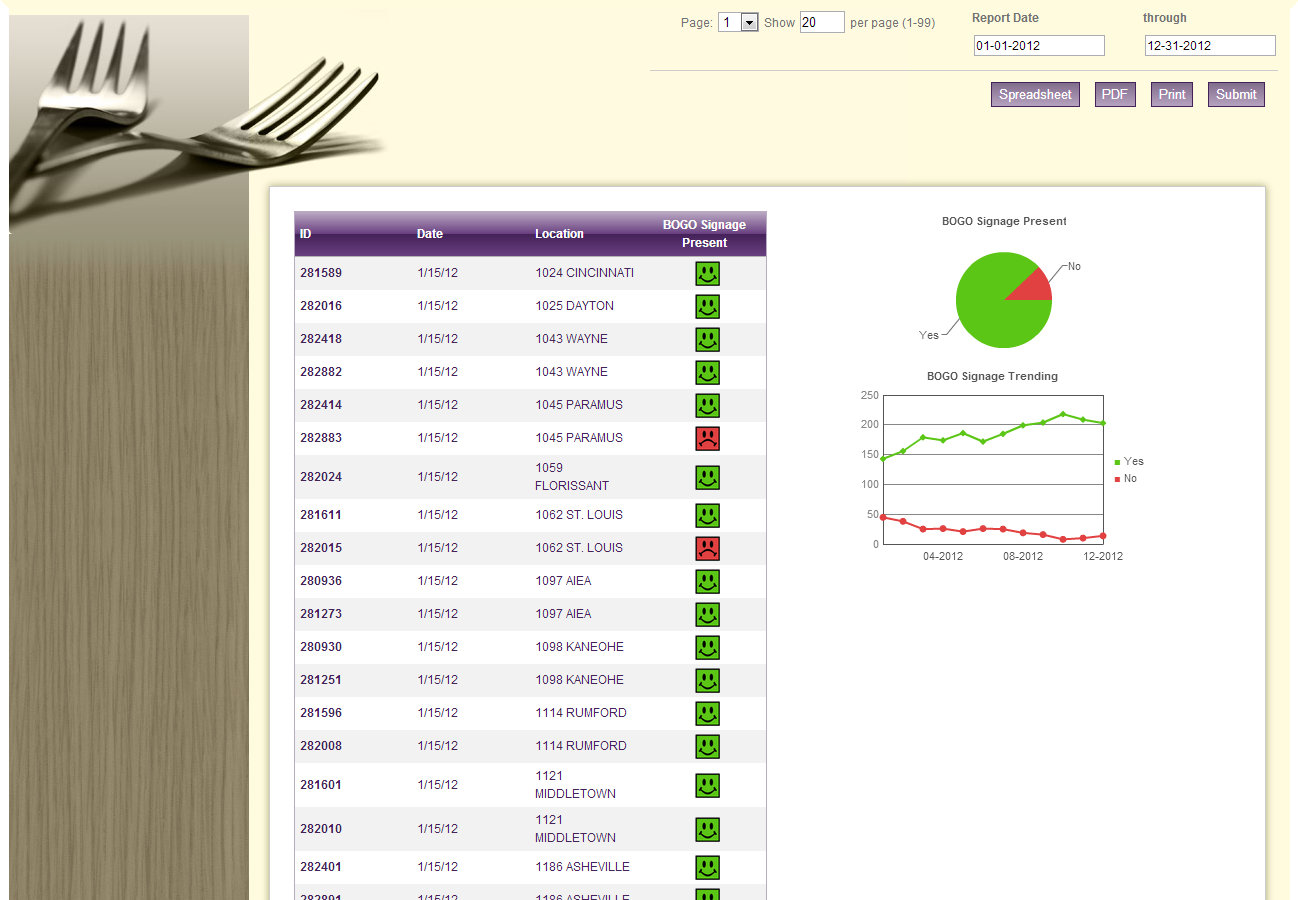
Code
{|SHOWIF|OUTPUT_MODE=|EVALCONST(KNICKERS_OUTPUT_STANDARD)|}{DATATYPES.CONTROLS_START}
{DATATYPES.DEFAULT_DATE_FILTERS}
{DATATYPES.SHOW_DATATYPE.RESULT_CONTROLS.PAGING.INPUT}
{DATATYPES.CONTROLS_END}{/|SHOWIF|}
<div class='results'>
{|VANISHIF|COUNT(DATATYPES.SHOW_DATATYPE)}
<div class='ui-state-highlight no-data'><p>No data was found to display</p></div>
{/|VANISHIF|}
{|SHOWIF|COUNT(DATATYPES.SHOW_DATATYPE)}
# show only saturday & sunday (day of week 6 and 7)
# and only yes/no responses (not n/a)
{|RESULT|FILTERSET=DAY_OF_WEEK_ID|gte|6;CLIENT_49_SURVEY_1229_QUESTION_71_ID|lt|3}
<div id='data-table'>
<table class='data'>
<thead>
<tr>
<th>ID</th>
<th>Date</th>
<th>{DATATYPES.SHOW_DATATYPE.CLIENT_49_LEVEL_1.NAME}</th>
<th class='bogo-header'>BOGO Signage Present</th>
</tr>
</thead>
<tbody>
#sort our log by date and location name
{|LOOP|RESULT.DATAPOINTS(SORTSET=TRENDING_TIMESTAMP|ASC;CLIENT_49_LEVEL_1.NAME)}
<tr>
<th>{DATAPOINTS.DATAPOINT_ID}</th>
<td>{DATAPOINTS.TRENDING_TIMESTAMP.FORMATTED(n/d/y)}</td>
<td>{DATAPOINTS.CLIENT_49_LEVEL_1.NAME}</td>
#set a class based on the response so we can show an image
<td class="bogo-signage bogo-value-{DATAPOINTS.CLIENT_49_SURVEY_1229_QUESTION_71.NAME.LOWER}"></td>
</tr>
{/|LOOP|}
</tbody>
</table>
</div>
{/|RESULT|}
<div id='summary-graph'>
#same filters as above
{|RESULT|FILTERSET=DAY_OF_WEEK_ID|gte|6;CLIENT_49_SURVEY_1229_QUESTION_71_ID|lt|3}
#pie chart displaying count of yes and no responses
{|GRAPH|}
graph/t/p
/w/300
/h/150
/n/BOGO%20Signage%20Present
#data is made up of count of yes/no responses
/d/{|LOOP|RESULT.CLIENT_49_SURVEY_1229_QUESTION_71(SORT=ORDER_NUM)}
{COUNT(CLIENT_49_SURVEY_1229_QUESTION_71)}{LOOP.HASNEXT?,}
{/|LOOP|}
#labels are the response text
/l/{|LOOP|RESULT.CLIENT_49_SURVEY_1229_QUESTION_71(SORT=ORDER_NUM)}
{CLIENT_49_SURVEY_1229_QUESTION_71.NAME.URLENCODE}{LOOP.HASNEXT?,}
{/|LOOP|}
#match our colors to the images
/c/5BC616,E14141
?apikey={CONFIG.PDF_API_KEY}
{/|GRAPH|}
{/|RESULT|}
#trending graph: answer options vs month
{|CROSSTAB|}
{|GRAPH|}
graph/t/l
/w/300
/h/200
/n/BOGO%20Signage%20Trending
#data made up of answer options (filtering out N/A)
#crosstabbed with month-year
/d0/{|LOOP|CROSSTAB.CLIENT_49_SURVEY_1229_QUESTION_71(SORT=ORDER_NUM,FILTER=ID|lt|3)}
{|LOOP|CLIENT_49_SURVEY_1229_QUESTION_71.MONTH_YEAR(SORT=ORDER_NUM,CROSSTAB_FILTER=WITH_BLANKS_IN_RANGE)}
{COUNT(MONTH_YEAR)}{LOOP.HASNEXT?,}
{/|LOOP|}
#show another data header if there's more data to come
{|SHOWIF|LOOP.HASNEXT}/d{LOOP.COUNT}/{/|SHOWIF|}
#on the last time through, also display our month-year axis labels
{|VANISHIF|LOOP.HASNEXT}
/l/{|LOOP|CLIENT_49_SURVEY_1229_QUESTION_71.MONTH_YEAR}
#only display the label for every 4th month
#this keeps the axis from getting too crowded
{|VANISHIF|LOOP.COUNTMOD(4)}
{MONTH_YEAR.NAME.FUSIONSAFE}
{/|VANISHIF|}
#we always want to display a comma, though, or else our graph will get mis-aligned
{LOOP.HASNEXT?,}
{/|LOOP|}
{/|VANISHIF|}
{/|LOOP|}
#legend keys - one for each answer option
/k0/{|LOOP|CROSSTAB.CLIENT_49_SURVEY_1229_QUESTION_71}
{CLIENT_49_SURVEY_1229_QUESTION_71.NAME.FUSIONSAFE}
{|LOOP|CLIENT_49_SURVEY_1229_QUESTION_71.MONTH_YEAR}{/|LOOP|}
{|SHOWIF|LOOP.HASNEXT}/k{LOOP.COUNT}/{/|SHOWIF|}
{/|LOOP|}
#match our colors to the images
/c/5BC616,E14141
?apikey={CONFIG.PDF_API_KEY}
{/|GRAPH|}
{/|CROSSTAB|}
</div>
{/|SHOWIF|}
</div>
CSS
/* css for BOGOWeekendSignage1347469374917 */
@import "themeroller/jquery.ui.all.css";
@import "chrome.theme.css";
@import "chrome.layout.css";
.bogo-header
{
text-align:center;
}
.bogo-signage
{
height: 25px;
background-repeat:no-repeat;
background-size:25px 25px;
background-position:center;
}
.bogo-value-yes
{
background-image: url('http://www.sassieshop.com/2su/images/general/ratings/smiley_squares/rating50positive.gif');
}
.bogo-value-no
{
background-image: url('http://www.sassieshop.com/2su/images/general/ratings/smiley_squares/rating50negative.gif');
}
#data-table,
#summary-graph
{
float: left;
width: 50%;
}
#data-table table
{
width: auto;
float: right;
}
/***** dining 2012 *****/
body {
background: #cccc99;
}
.wrap {
padding-bottom: 2em;
}
header.main, .header.main {
background: transparent;
border: 0;
padding: 0;
-moz-box-shadow: none;
-webkit-box-shadow: none;
box-shadow: none;
}
#content {
background: #fffbdf url("http://sassieshop.com/2su/images/semantic/dining/bg_side_header.gif") no-repeat 0px 225px;
border: 9px solid #fff;
border-top: 9px solid #fffbdf;
padding: 0;
-moz-border-radius: 0;
-webkit-border-radius: 0;
border-radius: 0;
-moz-box-shadow: 0px 0px 12px #a5a573;
-webkit-box-shadow: 0px 0px 12px #a5a573;
box-shadow: 0px 0px 12px #a5a573;
}
fieldset {
background: #fffbdf url("http://sassieshop.com/2su/images/semantic/dining/bg_container.jpg") no-repeat;
border: 0;
height: 225px;
padding: 0 1em;
text-align: right;
}
fieldset > div, fieldset .level-input {
float: right;
width: 25%;
text-align: left;
}
fieldset .date-input {
width: auto;
}
fieldset .date-input div {
float: left;
margin-left: 3em;
}
fieldset .controls {
border-top: 1px solid #ccc;
clear: both;
padding-top: 9px;
width: 50%;
}
fieldset .controls button {
background: #816d8c; /* Old browsers */
background: -moz-linear-gradient(top, #816d8c 0%, #b6a3bf 100%); /* FF3.6+ */
background: -webkit-gradient(linear, left top, left bottom, color-stop(0%,#816d8c), color-stop(100%,#b6a3bf)); /* Chrome,Safari4+ */
background: -webkit-linear-gradient(top, #816d8c 0%,#b6a3bf 100%); /* Chrome10+,Safari5.1+ */
background: -o-linear-gradient(top, #816d8c 0%,#b6a3bf 100%); /* Opera 11.10+ */
background: -ms-linear-gradient(top, #816d8c 0%,#b6a3bf 100%); /* IE10+ */
background: linear-gradient(to bottom, #816d8c 0%,#b6a3bf 100%); /* W3C */
filter: progid:DXImageTransform.Microsoft.gradient( startColorstr='#816d8c', endColorstr='#b6a3bf',GradientType=0 ); /* IE6-9 */
border: 1px solid #452259;
color: #fff;
font-size: 1.1em;
float: right;
margin-right: 1em;
padding: .25em .5em;
-moz-border-radius: 0;
-webkit-border-radius: 0;
border-radius: 0;
}
fieldset .controls button:hover {
background: #452259;
border: 2px solid #2e6e9e;
color: #fff;
-moz-box-shadow: 0px 0px 12px #fff;
-webkit-box-shadow: 0px 0px 12px #fff;
box-shadow: 0px 0px 12px #fff;
border: 1px solid #fff;
}
.results {
background: #fff;
border: 1px solid #ccc;
margin: -4em 2em 1em 260px;
padding: 2em;
-moz-box-shadow: 0px 0px 12px #a5a573;
-webkit-box-shadow: 0px 0px 12px #a5a573;
box-shadow: 0px 0px 12px #a5a573;
}
.results:before,
.results:after {
content:"";
display:table;
}
.results:after {
clear:both;
}
#data-table table {
border: 1px solid #bbaac4;
float: none;
width: 100%;
}
thead th {
background: #bbaac4; /* Old browsers */
background: -moz-linear-gradient(top, #bbaac4 0%, #683f7f 50%, #452259 51%, #683f7f 100%); /* FF3.6+ */
background: -webkit-gradient(linear, left top, left bottom, color-stop(0%,#bbaac4), color-stop(50%,#683f7f), color-stop(51%,#452259), color-stop(100%,#683f7f)); /* Chrome,Safari4+ */
background: -webkit-linear-gradient(top, #bbaac4 0%,#683f7f 50%,#452259 51%,#683f7f 100%); /* Chrome10+,Safari5.1+ */
background: -o-linear-gradient(top, #bbaac4 0%,#683f7f 50%,#452259 51%,#683f7f 100%); /* Opera 11.10+ */
background: -ms-linear-gradient(top, #bbaac4 0%,#683f7f 50%,#452259 51%,#683f7f 100%); /* IE10+ */
background: linear-gradient(to bottom, #bbaac4 0%,#683f7f 50%,#452259 51%,#683f7f 100%); /* W3C */
filter: progid:DXImageTransform.Microsoft.gradient( startColorstr='#bbaac4', endColorstr='#683f7f',GradientType=0 ); /* IE6-9 */
color: #fff;
}
tbody tr:nth-child(odd) {
background: #f5f0f7;
color: #452259;
}
tbody tr:nth-child(even) {
background: #fff;
color: #452259;
}
tbody tr th {
background: transparent
}
#summary-graph .grapher {
margin: 0 auto;
text-align: center;
}
/***** print mode *****/
body.output-mode-print,
.output-mode-print #content,
.output-mode-print .results
{
background: #fff;
border: 0;
margin: 0 auto;
padding: 0;
-moz-box-shadow: none;
-webkit-box-shadow: none;
box-shadow: none;
}
.output-mode-print .results {
margin: 2em;
}