
Use Case
The client would like to see how their sectional scores are varying from month to month. They would like to view a six-month time period. They would also prefer that the sectional scores be grouped together rather than split out over the months. They would like to see this data in both graphical and tabular format.
Report
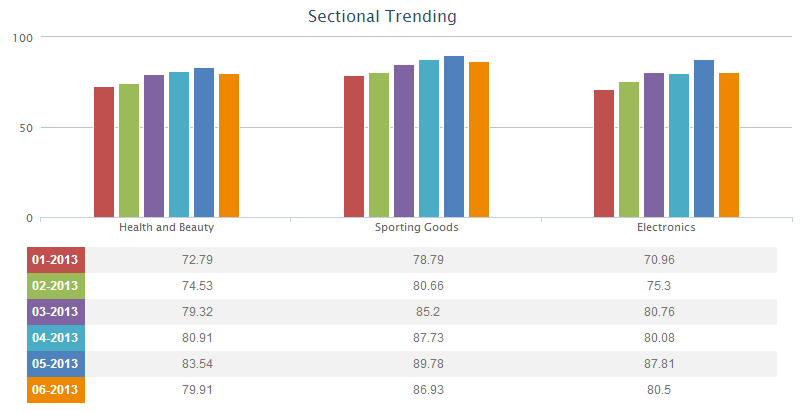
Code
{|SHOWIF|OUTPUT_MODE=|EVALCONST(KNICKERS_OUTPUT_STANDARD)|}{DATATYPES.CONTROLS_START}
{DATATYPES.DEFAULT_DATE_FILTERS}
{DATATYPES.CONTROLS_END}{/|SHOWIF|}
<div class='results'>
{|VANISHIF|DATATYPES.SHOW_DATATYPE.TOTAL_COUNT}
<div class='ui-state-highlight no-data'><p>No data was found to display</p></div>
{/|VANISHIF|}
{|SHOWIF|DATATYPES.SHOW_DATATYPE.TOTAL_COUNT}
#because we are interested in only one group (month-years) we use a RESULT type
{|RESULT|}
<div id="graph-container">
<div id="my-graph">
{|HIGHCHARTS|}
{
#vertical bar charts are of type 'column'
#our graph is 800x250 pixels
"chart": {
"type": "column",
"height": 250,
"width": 800
},
#the graph's title
"title": {
"text": "Sectional Trending",
"x": -20
},
#y axis settings
"yAxis": {
"title": {
"text": ""
},
"min": 0,
"max": 100
},
#we're displaying the legend in the table below
"legend": {
"enabled": false
},
#hide the highcharts label
"credits": {
"enabled": false
},
#don't animate our graph
"plotOptions": {
"column": {
"animation": false
}
},
"colors":["#C0504D","#9BBB59","#8064A2","#4BACC6","#4F81BD","#ee8800"],
"xAxis":
{
#the x axis labels - one for each property
"categories": [{|LOOP|DATATYPES.SHOW_DATATYPE.PROPERTIES(FILTER=type|eq|sectional_percent_score,SORT=ORDER_NUM)}
#HC_SAFE_STRING handles escaping quotes - names need quotes around them
"{PROPERTIES.NAME.SPLIT(:,1)?|EVALTAG(PROPERTIES.NAME.SPLIT(:,1).HC_SAFE_STRING)|:|EVALTAG(PROPERTIES.NAME.HC_SAFE_STRING)|}"{LOOP.HASNEXT?,}
{/|LOOP|}
]
},
"series": [
#one series per property
{|LOOP|RESULT.MONTH_YEAR(SORT=ORDER_NUM,CROSSTAB_FILTER=WITH_BLANKS_IN_RANGE,LIMIT=6)}
{
"name": "{MONTH_YEAR.NAME.HC_SAFE_STRING}",
"data": [
{|LOOP|MONTH_YEAR.PROPERTIES(FILTER=type|eq|sectional_percent_score,SORT=ORDER_NUM)}
{AVG(MONTH_YEAR.PROPERTIES.VALUE).HC_SAFE_NUMBER}{LOOP.HASNEXT?,}
{/|LOOP|}
]
}{LOOP.HASNEXT?,}
{/|LOOP|}
]
}
{/|HIGHCHARTS|}
</div>
</div>
<table class='data' id='trending-table'>
<tbody>
{|LOOP|RESULT.MONTH_YEAR}
<tr>
#using LOOP.COUNT, we can use css to set the row header colors to match the graph
<th class="month-row-{LOOP.COUNT}">{MONTH_YEAR.NAME}</th>
{|LOOP|MONTH_YEAR.PROPERTIES(FILTER=type|eq|sectional_percent_score,SORT=NAME)}
<td>{AVG(MONTH_YEAR.PROPERTIES.VALUE).ROUND(2)}</td>
{/|LOOP|}
</tr>
{/|LOOP|}
</tbody>
</table>
{/|RESULT|}
{/|SHOWIF|}
</div>
CSS
/* css for SectionalTrending1347390473050 */
@import "themeroller/jquery.ui.all.css";
@import "chrome.theme.css";
@import "chrome.layout.css";
.results
{
text-align: center;
}
#graph-container
{
width: 100%;
}
#my-graph
{
width: 800px;
margin: auto;
}
#trending-table
{
width: 750px;
margin: auto;
}
#trending-table tbody th
{
color: #fff;
width: 49px;
padding-right: 4px;
}
#trending-table tbody td
{
text-align: center;
}
.month-row-1
{
background-color: #C0504D;
}
.month-row-2
{
background-color: #9BBB59;
}
.month-row-3
{
background-color: #8064A2;
}
.month-row-4
{
background-color: #4BACC6;
}
.month-row-5
{
background-color: #4F81BD;
}
.month-row-6
{
background-color: #ee8800;
}